You may have noticed that your product doesn’t come with a charging cable or a power adapter. At Logitech, we’re working hard to reduce our carbon impact and have a positive impact on the planet. We’re embracing circularity and looking into new ways to reduce e-waste. Therefore, we invite you to practice a circularity method by using your existing power adapter and cable to charge your speakers.
You can charge your speaker with any standard USB-C port, such as your computer. However, to charge it effectively, we highly recommend that you use a power adapter to plug your MINIROLL into an outlet directly. Charging times vary depending on the output of the power adapter you use.
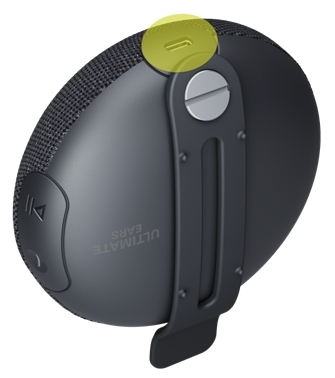
Please make sure to use adapters that are listed with at least 2.5W to get the fastest charging performance. It will take approximately three hours to recharge your MINIROLL to 100%. To check the power provided by an adapter, simply multiply the output voltage by the current marked on the adapter. For example, the output power of an adapter with a voltage of 5V and current of 3A (5V⎓3A) will be 5V x 3A = 15W. If the adapter’s power (W) is lower than 2.5W, it may take much longer for your speaker to be charged fully.
NOTE: It will also take longer to charge if you are listening to music while charging your speakers. Also, if you use an adapter that provides higher power than 2.5W, it won’t charge your speaker any faster.
See the Specifications for more information.
Důležitá poznámka: Nástroj pro aktualizaci firmwaru již není společností Logitech podporován ani udržován. Důrazně doporučujeme pro vaše podporovaná zařízení Logitech použít aplikaci Logi Options+. Jsme tu, abychom vám při tomto přechodu pomohli.
Důležitá poznámka: Aplikace Logitech Preference Manager již není společností Logitech podporována ani udržována. Důrazně doporučujeme pro vaše podporovaná zařízení Logitech použít aplikaci Logi Options+. Jsme tu, abychom vám při tomto přechodu pomohli.
Důležitá poznámka: Aplikace Logitech Control Center již není společností Logitech podporována ani udržována. Důrazně doporučujeme pro vaše podporovaná zařízení Logitech použít aplikaci Logi Options+. Jsme tu, abychom vám při tomto přechodu pomohli.
Důležitá poznámka: Nástroj Logitech Connection Utility již není společností Logitech podporován ani udržován. Důrazně doporučujeme pro vaše podporovaná zařízení Logitech použít aplikaci Logi Options+. Jsme tu, abychom vám při tomto přechodu pomohli.
Důležitá poznámka: Software Unifying již není společností Logitech podporován ani udržován. Důrazně doporučujeme pro vaše podporovaná zařízení Logitech použít aplikaci Logi Options+. Jsme tu, abychom vám při tomto přechodu pomohli.
Důležitá poznámka: Software SetPoint již není společností Logitech podporován ani udržován. Důrazně doporučujeme pro vaše podporovaná zařízení Logitech použít aplikaci Logi Options+. Jsme tu, abychom vám při tomto přechodu pomohli.
Časté otázky
V této sekci nejsou dostupné žádné produkty
Pro tento produkt nejsou k dispozici žádné Soubory ke stažení
Pro tuto verzi nejsou k dispozici žádné soubory ke stažení.
Compatible Product
