To switch from the USB receiver to Bluetooth, simply play audio on the connected Bluetooth device.
Audio will start playing automatically as the Bluetooth connection takes priority over the USB receiver.
To switch from Bluetooth to the USB receiver:
- Since the Bluetooth connection takes priority over the receiver, pause the audio on the connected Bluetooth device.
- Then, play audio on the device connected to the receiver.
Based on your preference, you can select when to let Bluetooth connected devices take priority over the receiver connected device on the Logi Tune app.
On the Logi Tune app, go to Connected Devices and click the Setting icon  next to Bluetooth connected devices.
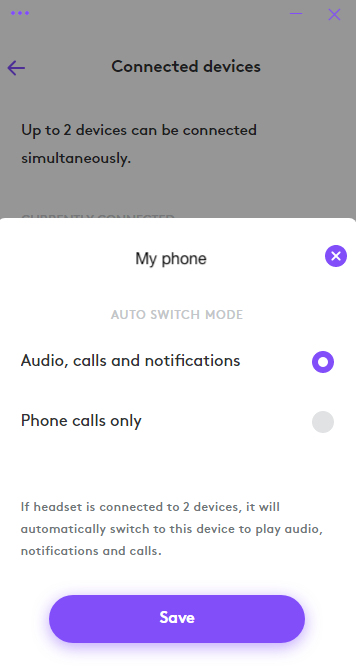
- If you select Audio, calls and notifications, the Bluetooth connected device will override the receiver connected device when there are audio, calls and notifications on the Bluetooth connected device.
- If you select Phone calls only, the Bluetooth connected device will only override the receiver connected device when there is a call on the Bluetooth connected device.
This setting will be defaulted to Audio, calls and notifications every time the headset powers off.
Wichtiger Hinweis: Das Firmware Update Tool wird von Logitech nicht mehr unterstützt oder gepflegt. Wir empfehlen dringend die Verwendung von Logi Options+ für Ihre unterstützten Logitech-Geräte. Während dieser Übergangsphase stehen wir Ihnen gern zur Seite.
Wichtiger Hinweis: Der Logitech Preference Manager wird nicht mehr von Logitech unterstützt oder gepflegt. Wir empfehlen dringend die Verwendung von Logi Options+ für Ihre unterstützten Logitech-Geräte. Während dieser Übergangsphase stehen wir Ihnen gern zur Seite.
Wichtiger Hinweis: Das Logitech Control Center wird nicht mehr von Logitech unterstützt oder gepflegt. Wir empfehlen dringend die Verwendung von Logi Options+ für Ihre unterstützten Logitech-Geräte. Während dieser Übergangsphase stehen wir Ihnen gern zur Seite.
Wichtiger Hinweis: Logitech Connection Utility wird von Logitech nicht mehr unterstützt oder gepflegt. Wir empfehlen dringend die Verwendung von Logi Options+ für Ihre unterstützten Logitech-Geräte. Während dieser Übergangsphase stehen wir Ihnen gern zur Seite.
Wichtiger Hinweis: Die Unifying-Software wird von Logitech nicht mehr unterstützt oder gepflegt. Wir empfehlen dringend die Verwendung von Logi Options+ für Ihre unterstützten Logitech-Geräte. Während dieser Übergangsphase stehen wir Ihnen gern zur Seite.
Wichtiger Hinweis: Die SetPoint-Software wird von Logitech nicht mehr unterstützt oder gewartet. Wir empfehlen dringend die Verwendung von Logi Options+ für Ihre unterstützten Logitech-Geräte. Während dieser Übergangsphase stehen wir Ihnen gern zur Seite.
Häufig gestellte Fragen – FAQs
Für diesen Abschnitt sind keine Produkte verfügbar
Für dieses Produkt sind keine Downloads vorhanden
Für diese Version gibt es keine Downloads.
Compatible Product
