| Button | Usage | Action | |
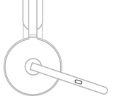 |
Call Controls | Answer / End call | Short press |
| Reject call | Two second press | ||
| Resume call | Short press | ||
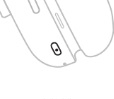 |
ANC Controls | Toggle between ANC and Transparency | Short press |
| ANC and Transparency off | Two second press | ||
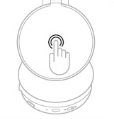 |
Media controls | Play / Pause | Double tap |
| Track forward | Triple tap | ||
| Volume controls | Volume up | Swipe up | |
| Volume down | Swipe down | ||
| Headset status | Check connectivity and battery status | Tap and hold for two seconds | |
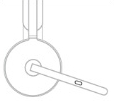 |
Mute | Mute on | Short press |
| Mute off | Short press | ||
| Voice assistance | Trigger voice assistant | Two second press (when mic is down) | |
NOTES:
- Media control functionality depends on the type of application.
- Call activities are always the first priority over media streaming. When two devices are connected, the Bluetooth connection will be prioritized over the receiver. When two Bluetooth devices are connected, the last active device will take a priority over the other. You can customize the priority between two Bluetooth devices on the Logi Tune app under Connected devices.
TIP: ANC and touch controls can also be customized on the Logi Tune app.
Wichtiger Hinweis: Das Firmware Update Tool wird von Logitech nicht mehr unterstützt oder gepflegt. Wir empfehlen dringend die Verwendung von Logi Options+ für Ihre unterstützten Logitech-Geräte. Während dieser Übergangsphase stehen wir Ihnen gern zur Seite.
Wichtiger Hinweis: Der Logitech Preference Manager wird nicht mehr von Logitech unterstützt oder gepflegt. Wir empfehlen dringend die Verwendung von Logi Options+ für Ihre unterstützten Logitech-Geräte. Während dieser Übergangsphase stehen wir Ihnen gern zur Seite.
Wichtiger Hinweis: Das Logitech Control Center wird nicht mehr von Logitech unterstützt oder gepflegt. Wir empfehlen dringend die Verwendung von Logi Options+ für Ihre unterstützten Logitech-Geräte. Während dieser Übergangsphase stehen wir Ihnen gern zur Seite.
Wichtiger Hinweis: Logitech Connection Utility wird von Logitech nicht mehr unterstützt oder gepflegt. Wir empfehlen dringend die Verwendung von Logi Options+ für Ihre unterstützten Logitech-Geräte. Während dieser Übergangsphase stehen wir Ihnen gern zur Seite.
Wichtiger Hinweis: Die Unifying-Software wird von Logitech nicht mehr unterstützt oder gepflegt. Wir empfehlen dringend die Verwendung von Logi Options+ für Ihre unterstützten Logitech-Geräte. Während dieser Übergangsphase stehen wir Ihnen gern zur Seite.
Wichtiger Hinweis: Die SetPoint-Software wird von Logitech nicht mehr unterstützt oder gewartet. Wir empfehlen dringend die Verwendung von Logi Options+ für Ihre unterstützten Logitech-Geräte. Während dieser Übergangsphase stehen wir Ihnen gern zur Seite.
Häufig gestellte Fragen – FAQs
Für diesen Abschnitt sind keine Produkte verfügbar
Für dieses Produkt sind keine Downloads vorhanden
Für diese Version gibt es keine Downloads.
Compatible Product
