If your iPad stops responding to your tablet keyboard in apps such as Notes and Safari, you can use the steps below to try to resolve the issue. Test the keyboard between each step to see if functionality is restored.
-
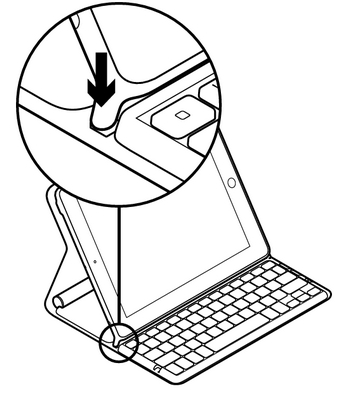
Make sure your keyboard is in a proper typing position. The tablet keyboard will only turn on when it's in either the Typing or Media mode. Typing mode is shown below. See answer 360023410413 for instructions on how to place the keyboard into Media mode.
-
Power your tablet keyboard off, and then back on. You can do this by fully closing the Logitech Solar Keyboard Folio. Wait 5 seconds, and then reopen the keyboard and set it back into a typing position.
-
Charge the Logitech Solar Keyboard Folio completely (see answer 360023410413 for instructions).
-
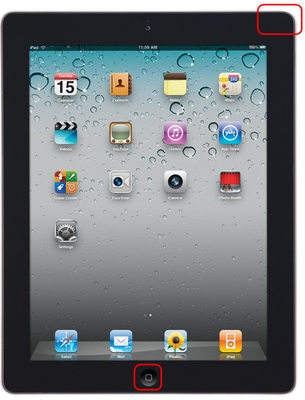
Restart your iPad by pressing and holding the Home and Sleep/Wake buttons together until the screen goes blank. Then, wait for the iPad to reboot.
-
Make sure your tablet keyboard is properly paired with your iPad. To reconnect it, see answer 360023410413 for instructions.
Important Notice: The Firmware Update Tool is no longer supported or maintained by Logitech. We highly recommend using Logi Options+ for your supported Logitech devices. We are here to assist you during this transition.
Important Notice: The Logitech Preference Manager is no longer supported or maintained by Logitech. We highly recommend using Logi Options+ for your supported Logitech devices. We are here to assist you during this transition.
Important Notice: The Logitech Control Center is no longer supported or maintained by Logitech. We highly recommend using Logi Options+ for your supported Logitech devices. We are here to assist you during this transition.
Important Notice: The Logitech Connection Utility is no longer supported or maintained by Logitech. We highly recommend using Logi Options+ for your supported Logitech devices. We are here to assist you during this transition.
Important Notice: The Unifying Software is no longer supported or maintained by Logitech. We highly recommend using Logi Options+ for your supported Logitech devices. We are here to assist you during this transition.
Important Notice: The SetPoint software is no longer supported or maintained by Logitech. We highly recommend using Logi Options+ for your supported Logitech devices. We are here to assist you during this transition.
Frequently Asked Questions
There are no products available for this section
There are no Downloads for this Product
There are no Downloads for this Version
Compatible Product
