The Logitech HD Powerline 200 or 200a Network Adapter comes with LED indicators for:
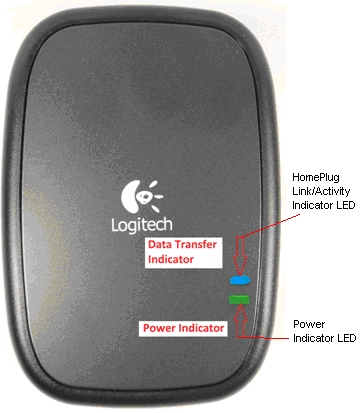
On the front side of the adapter, there are two LED indicator lights at the lower right that reflect the power status and HomePlug (or power line communication) activity.
-
Power LED indicator - green
-
Off. When the green light is off, no power is flowing to the adapter.
-
On. When the green light is lit, the AC power is flowing.
-
-
HomePlug LED indicator - blue
-
Off. When the blue light is off, the HomePlug network is not connected.
-
Solid. When the blue light is steadily on, the HomePlug network is connected.
-
Flashing. When the blue light flashes, the HomePlug network is connected and transmitting data.
-
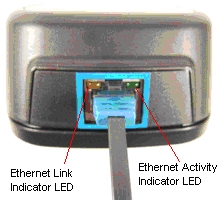
There two Ethernet LED indicators located on the bottom edge of the adapter on either side of the Ethernet connector jack.
-
Traffic and data flow indicator - green
-
Off. When the green light is off, there is no data flow happening.
-
Flashing. When the green light flashes, data is being transmitted.
-
-
Ethernet link indicator - amber
-
Off. When the amber light is off, there is no Ethernet connection..
-
Solid. When the amber light is steadily on, an Ethernet link has been established.
-
Important Notice: The Firmware Update Tool is no longer supported or maintained by Logitech. We highly recommend using Logi Options+ for your supported Logitech devices. We are here to assist you during this transition.
Important Notice: The Logitech Preference Manager is no longer supported or maintained by Logitech. We highly recommend using Logi Options+ for your supported Logitech devices. We are here to assist you during this transition.
Important Notice: The Logitech Control Center is no longer supported or maintained by Logitech. We highly recommend using Logi Options+ for your supported Logitech devices. We are here to assist you during this transition.
Important Notice: The Logitech Connection Utility is no longer supported or maintained by Logitech. We highly recommend using Logi Options+ for your supported Logitech devices. We are here to assist you during this transition.
Important Notice: The Unifying Software is no longer supported or maintained by Logitech. We highly recommend using Logi Options+ for your supported Logitech devices. We are here to assist you during this transition.
Important Notice: The SetPoint software is no longer supported or maintained by Logitech. We highly recommend using Logi Options+ for your supported Logitech devices. We are here to assist you during this transition.
Frequently Asked Questions
There are no products available for this section
There are no Downloads for this Product
There are no Downloads for this Version
Compatible Product
