Your G940 has a Mode switch located near the thumb area on the throttle control as shown below:
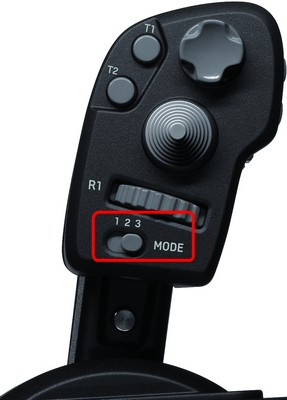
The Mode switch allows you to assign up to three button configurations assigned simultaneously to a game. These settings cover the entire G940 – they are not limited to the throttle.
NOTE: If you do not plug in your throttle control, the Mode switch will automatically revert to Mode 1.
To configure a mode for a game-specific profile, do the following:
-
Open the Logitech Profile software
-
Select or create a profile for a game. For assistance with creating profiles, go to Help > Tutorials in the Profiler software.
-
Move the Mode switch to one of the three presets (1, 2 or 3).
-
Configure the keystrokes/configurations you would like to have for that mode. When done, move the switch to a different position, then configure additional keystrokes for that mode as well.
To select a different mode while in a game, move the Mode switch to the desired mode number.
Important Notice: The Firmware Update Tool is no longer supported or maintained by Logitech. We highly recommend using Logi Options+ for your supported Logitech devices. We are here to assist you during this transition.
Important Notice: The Logitech Preference Manager is no longer supported or maintained by Logitech. We highly recommend using Logi Options+ for your supported Logitech devices. We are here to assist you during this transition.
Important Notice: The Logitech Control Center is no longer supported or maintained by Logitech. We highly recommend using Logi Options+ for your supported Logitech devices. We are here to assist you during this transition.
Important Notice: The Logitech Connection Utility is no longer supported or maintained by Logitech. We highly recommend using Logi Options+ for your supported Logitech devices. We are here to assist you during this transition.
Important Notice: The Unifying Software is no longer supported or maintained by Logitech. We highly recommend using Logi Options+ for your supported Logitech devices. We are here to assist you during this transition.
Important Notice: The SetPoint software is no longer supported or maintained by Logitech. We highly recommend using Logi Options+ for your supported Logitech devices. We are here to assist you during this transition.
Frequently Asked Questions
There are no products available for this section
There are no Downloads for this Product
There are no Downloads for this Version
Compatible Product
