The Sleep Timer on your Harmony 900 can be used to automatically power off your system after a desired period of time.
Note: If you are controlling devices directly without the Blaster, for the Sleep Timer to work effectively you must ensure that the remote is pointed directly at your devices when the Sleep Timer powers off your system.
To set the Sleep Timer, please follow these steps:
1. Launch an Activity
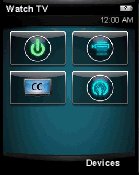
2. Press the Activities button
3. Use the Arrows on either side of the touch screen to scroll through your Activities pages until you see the Set Sleep Timer option
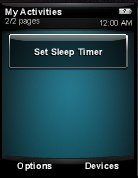
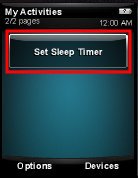
4. Select Set Sleep Timer
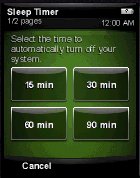
5. Select the amount of time you want the remote to wait before turning off your system
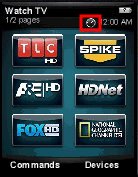
6. Press the Activities button to return to your activity. You will notice a clock icon at the top of the LCD screen, indicating that the sleep timer is active
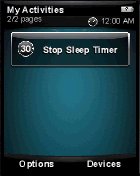
The Sleep Timer can be stopped at any time by selecting Stop Sleep Timer in your Activities screen. The amount of time remaining before your system is powered off is listed on the Stop Sleep Timer button.
Important Notice: The Firmware Update Tool is no longer supported or maintained by Logitech. We highly recommend using Logi Options+ for your supported Logitech devices. We are here to assist you during this transition.
Important Notice: The Logitech Preference Manager is no longer supported or maintained by Logitech. We highly recommend using Logi Options+ for your supported Logitech devices. We are here to assist you during this transition.
Important Notice: The Logitech Control Center is no longer supported or maintained by Logitech. We highly recommend using Logi Options+ for your supported Logitech devices. We are here to assist you during this transition.
Important Notice: The Logitech Connection Utility is no longer supported or maintained by Logitech. We highly recommend using Logi Options+ for your supported Logitech devices. We are here to assist you during this transition.
Important Notice: The Unifying Software is no longer supported or maintained by Logitech. We highly recommend using Logi Options+ for your supported Logitech devices. We are here to assist you during this transition.
Important Notice: The SetPoint software is no longer supported or maintained by Logitech. We highly recommend using Logi Options+ for your supported Logitech devices. We are here to assist you during this transition.
Frequently Asked Questions
There are no products available for this section
There are no Downloads for this Product
There are no Downloads for this Version
Compatible Product
