Document Flip allows you to switch between active applications when Logitech's Mouse and Keyboard software (SetPoint) is installed.
NOTE: Using the Document Flip feature in Windows Vista will activate the Switch Between Windows feature built into Vista.
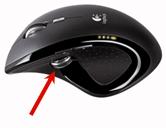
When SetPoint is installed, the Thumb Button will function as a Document Flip by default. This feature enables you to quickly switch between opened applications with a simple push of the Thumb Button.
If you do not have SetPoint installed, you can download the latest version from the MX Revolution Downloads Page.
-
Press or roll the Thumb Button to activate the Document Flip window.
-
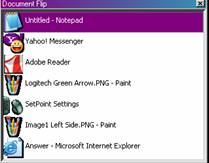
The Document Flip window will open and list all opened applications or documents.
NOTE: The Document Flip window will not appear if there are no active applications open.
-
Use your cursor or roll the scroll wheel to select the application. Once an application or document is highlighted, click on it to switch to the opened application or document.
Important Notice: The Firmware Update Tool is no longer supported or maintained by Logitech. We highly recommend using Logi Options+ for your supported Logitech devices. We are here to assist you during this transition.
Important Notice: The Logitech Preference Manager is no longer supported or maintained by Logitech. We highly recommend using Logi Options+ for your supported Logitech devices. We are here to assist you during this transition.
Important Notice: The Logitech Control Center is no longer supported or maintained by Logitech. We highly recommend using Logi Options+ for your supported Logitech devices. We are here to assist you during this transition.
Important Notice: The Logitech Connection Utility is no longer supported or maintained by Logitech. We highly recommend using Logi Options+ for your supported Logitech devices. We are here to assist you during this transition.
Important Notice: The Unifying Software is no longer supported or maintained by Logitech. We highly recommend using Logi Options+ for your supported Logitech devices. We are here to assist you during this transition.
Important Notice: The SetPoint software is no longer supported or maintained by Logitech. We highly recommend using Logi Options+ for your supported Logitech devices. We are here to assist you during this transition.
Frequently Asked Questions
There are no products available for this section
There are no Downloads for this Product
There are no Downloads for this Version
Compatible Product
