This issue occurs because of a configuration in the Harmony settings. The remote is either sending a command too many times or not often encough, depending on the sensitivity of the device.
Solution:
To resolve the issue, do the following:
- Launch the Logitech Harmony Remote software and login to your account
- Click on the
 tab
tab
- Click on the
 button for the device which is not responding correctly
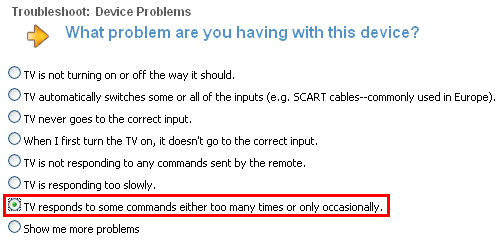
- Select ...responds to some commands either too many times or only occasionally.
- Lower the number of commands sent per button press if the commands are repeating unnecessarily. Raise the number if the device responds once when a button is pressed several times.
NOTE: the default is usually set to '3'.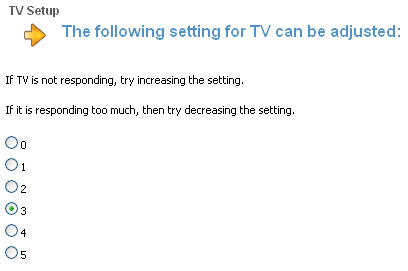
- Click on the
 button to save your changes
 - Click on the
 button to update your remote
Important Notice: The Firmware Update Tool is no longer supported or maintained by Logitech. We highly recommend using Logi Options+ for your supported Logitech devices. We are here to assist you during this transition.
Important Notice: The Logitech Preference Manager is no longer supported or maintained by Logitech. We highly recommend using Logi Options+ for your supported Logitech devices. We are here to assist you during this transition.
Important Notice: The Logitech Control Center is no longer supported or maintained by Logitech. We highly recommend using Logi Options+ for your supported Logitech devices. We are here to assist you during this transition.
Important Notice: The Logitech Connection Utility is no longer supported or maintained by Logitech. We highly recommend using Logi Options+ for your supported Logitech devices. We are here to assist you during this transition.
Important Notice: The Unifying Software is no longer supported or maintained by Logitech. We highly recommend using Logi Options+ for your supported Logitech devices. We are here to assist you during this transition.
Important Notice: The SetPoint software is no longer supported or maintained by Logitech. We highly recommend using Logi Options+ for your supported Logitech devices. We are here to assist you during this transition.
Frequently Asked Questions
There are no products available for this section
There are no Downloads for this Product
There are no Downloads for this Version
Compatible Product
