This article applies to the following products:
Harmony 890
Harmony 895
Harmony 890 Pro
Harmony 1000
Cause
The configuration on the RF Extender is corrupted, thus you may encounter difficulties updating your remote or upgrading the firmware.Solution
In order to resolve the issue, you need to put the RF Extender into safe mode. Please follow these steps:- Press and hold the Connect button while the RF Extender is powered
- Continue to hold the Connect button until the RF light starts to blink, then release the connect button.
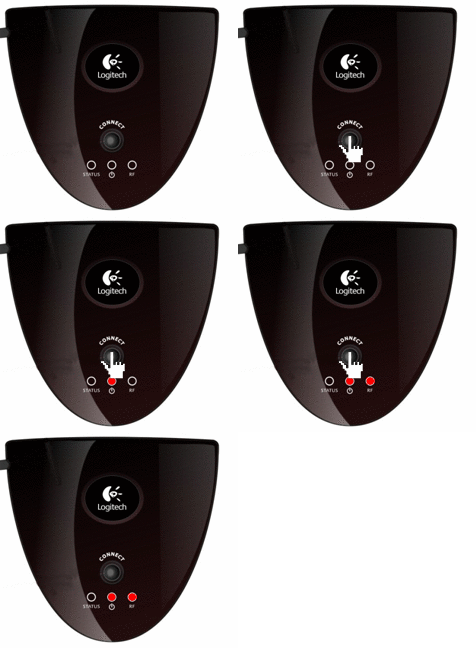
- Try upgrading the firmware or updating the RF Extender again.
Important Notice: The Firmware Update Tool is no longer supported or maintained by Logitech. We highly recommend using Logi Options+ for your supported Logitech devices. We are here to assist you during this transition.
Important Notice: The Logitech Preference Manager is no longer supported or maintained by Logitech. We highly recommend using Logi Options+ for your supported Logitech devices. We are here to assist you during this transition.
Important Notice: The Logitech Control Center is no longer supported or maintained by Logitech. We highly recommend using Logi Options+ for your supported Logitech devices. We are here to assist you during this transition.
Important Notice: The Logitech Connection Utility is no longer supported or maintained by Logitech. We highly recommend using Logi Options+ for your supported Logitech devices. We are here to assist you during this transition.
Important Notice: The Unifying Software is no longer supported or maintained by Logitech. We highly recommend using Logi Options+ for your supported Logitech devices. We are here to assist you during this transition.
Important Notice: The SetPoint software is no longer supported or maintained by Logitech. We highly recommend using Logi Options+ for your supported Logitech devices. We are here to assist you during this transition.
Frequently Asked Questions
There are no products available for this section
There are no Downloads for this Product
There are no Downloads for this Version
Compatible Product
