If you experience audio dropouts, try the following:
- Go to jaybirdsport.com/update on your PC or MAC and check if you have the latest firmware installed.
- To minimize audio dropouts, try to reduce the distance between your right earbud and your audio device. For example, try to have your audio device in your right pocket or on your right arm if running with an armband.
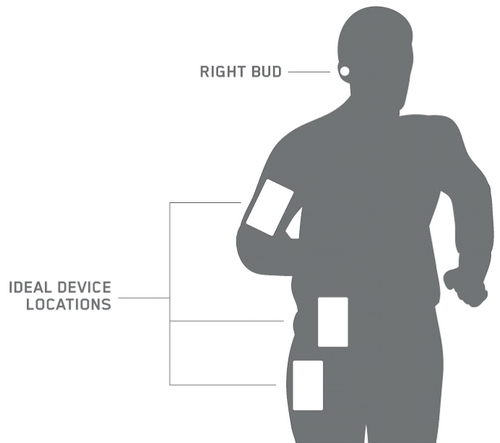
- While the range of most Bluetooth devices is 10 meters (33 feet), the optimal range for any Bluetooth audio device is about 60 centimeters (2 feet) from the audio source.
- Some environments, cell phone towers, dense wifi networks, and other transmitting devices can interfere with your Bluetooth connection. If possible, try to move away from the area or devices.
- Reset your Bluetooth connection by turning your device's Bluetooth off for at least 10 seconds and then back on. Please note, turning Bluetooth off and back on quickly will not reset the connection.
- Complete a reset of your right earbud which will clear the list of devices that your earbuds are paired to. See Reset the Jaybird RUN earbuds.
- If you can’t find a solution and your earbuds continue to not work as expected, please contact us:
- Contact Support
- Call 1 800-025-544
Important Notice: The Firmware Update Tool is no longer supported or maintained by Logitech. We highly recommend using Logi Options+ for your supported Logitech devices. We are here to assist you during this transition.
Important Notice: The Logitech Preference Manager is no longer supported or maintained by Logitech. We highly recommend using Logi Options+ for your supported Logitech devices. We are here to assist you during this transition.
Important Notice: The Logitech Control Center is no longer supported or maintained by Logitech. We highly recommend using Logi Options+ for your supported Logitech devices. We are here to assist you during this transition.
Important Notice: The Logitech Connection Utility is no longer supported or maintained by Logitech. We highly recommend using Logi Options+ for your supported Logitech devices. We are here to assist you during this transition.
Important Notice: The Unifying Software is no longer supported or maintained by Logitech. We highly recommend using Logi Options+ for your supported Logitech devices. We are here to assist you during this transition.
Important Notice: The SetPoint software is no longer supported or maintained by Logitech. We highly recommend using Logi Options+ for your supported Logitech devices. We are here to assist you during this transition.
Frequently Asked Questions
There are no products available for this section
There are no Downloads for this Product
There are no Downloads for this Version
Compatible Product
