- If you have Logitech Gaming Software (LGS) installed:
- Lower your DPI sensitivity in the Customize Pointer Settings tab.
- If your gaming mouse supports surface tuning, tune your mouse to the surface in use. See Surface Tuning your gaming mouse for more information.
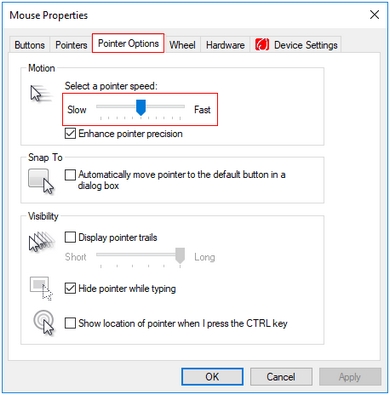
- If you don't have LGS installed, lower your Pointer Speed in Control Panel > Mouse > Pointer Options:
- If your mouse is wireless:
- Recharge the mouse using the included cable or replace the batteries.
- Make sure the mouse and USB receiver are at least 2 meters away from wireless routers and other 2.4 GHz wireless devices.
- Keep the USB receiver within 20 cm of the mouse.
- Temporarily disconnect any other wireless devices and observe the effect on the tracking performance.
- The sensor lens may be dirty. Turn your mouse over and thoroughly clean any dirt or lint covering the lens.
- Try using the mouse on a piece of white paper to make sure it isn't a tracking issue on a particular surface you're using.
Important Notice: The Firmware Update Tool is no longer supported or maintained by Logitech. We highly recommend using Logi Options+ for your supported Logitech devices. We are here to assist you during this transition.
Important Notice: The Logitech Preference Manager is no longer supported or maintained by Logitech. We highly recommend using Logi Options+ for your supported Logitech devices. We are here to assist you during this transition.
Important Notice: The Logitech Control Center is no longer supported or maintained by Logitech. We highly recommend using Logi Options+ for your supported Logitech devices. We are here to assist you during this transition.
Important Notice: The Logitech Connection Utility is no longer supported or maintained by Logitech. We highly recommend using Logi Options+ for your supported Logitech devices. We are here to assist you during this transition.
Important Notice: The Unifying Software is no longer supported or maintained by Logitech. We highly recommend using Logi Options+ for your supported Logitech devices. We are here to assist you during this transition.
Important Notice: The SetPoint software is no longer supported or maintained by Logitech. We highly recommend using Logi Options+ for your supported Logitech devices. We are here to assist you during this transition.
Frequently Asked Questions
There are no products available for this section
There are no Downloads for this Product
There are no Downloads for this Version
Compatible Product
