To charge your case:
- With the case closed, connect the included micro USB cable to the back of the charging case.

- Connect the other end of the micro USB charging cable to a power source.

- The LED in the middle of the charge case will indicate the charging status of the case:
- Green LED pulses = Charging
- Green LED solid = Fully charged
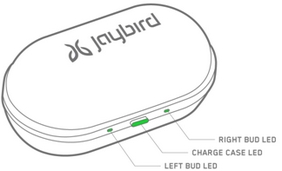
When the charge case runs low on battery the LED will turn red for about 10 seconds after you open or close the lid.
Make sure to check the charging source before you begin charging. We recommend using a computer as the safest method — anything 1 amp or less is safe. Some chargers can produce a lot more power than is needed to charge your earbuds, so avoid those if possible.
Important Notice: The Firmware Update Tool is no longer supported or maintained by Logitech. We highly recommend using Logi Options+ for your supported Logitech devices. We are here to assist you during this transition.
Important Notice: The Logitech Preference Manager is no longer supported or maintained by Logitech. We highly recommend using Logi Options+ for your supported Logitech devices. We are here to assist you during this transition.
Important Notice: The Logitech Control Center is no longer supported or maintained by Logitech. We highly recommend using Logi Options+ for your supported Logitech devices. We are here to assist you during this transition.
Important Notice: The Logitech Connection Utility is no longer supported or maintained by Logitech. We highly recommend using Logi Options+ for your supported Logitech devices. We are here to assist you during this transition.
Important Notice: The Unifying Software is no longer supported or maintained by Logitech. We highly recommend using Logi Options+ for your supported Logitech devices. We are here to assist you during this transition.
Important Notice: The SetPoint software is no longer supported or maintained by Logitech. We highly recommend using Logi Options+ for your supported Logitech devices. We are here to assist you during this transition.
Frequently Asked Questions
There are no products available for this section
There are no Downloads for this Product
There are no Downloads for this Version
Compatible Product
