You can adjust cursor settings for your trackpad using Logitech Preference Manager (LPM) software for Mac OS X (compatible with Mac OS 10.6.8 or later).
NOTE: If you don't already have Logitech Preference Manager installed, you can download it. See answer 360023413633 for instructions.
To adjust your trackpad's pointer (or cursor) settings:
-
Launch the Logitech Preference Manager software.
Apple Menu > System Preferences > Logitech Preference Manager
-
Click your connected trackpad shown on the device selection screen.
NOTE: If the trackpad is the only LPM-configurable device connected to the Mac, the settings window for that device will open automatically.
-
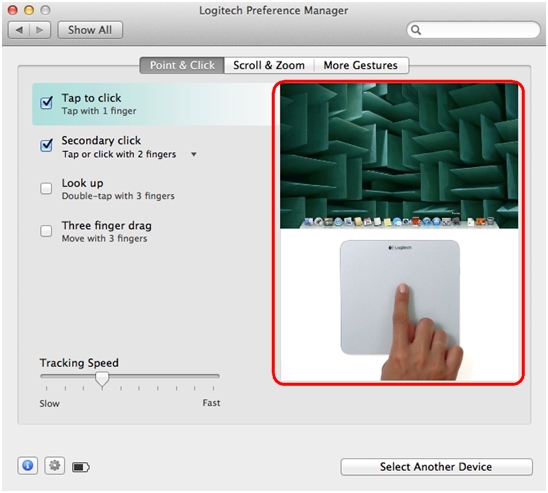
Navigate through the settings and adjust according to your preference. Setting adjustments are saved automatically.
NOTE: Video demonstrations of some point, scroll and gesture settings for your trackpad are available in the Logitech Preference Manager software. Hover your cursor over these settings to view the video demonstrations.
Important Notice: The Firmware Update Tool is no longer supported or maintained by Logitech. We highly recommend using Logi Options+ for your supported Logitech devices. We are here to assist you during this transition.
Important Notice: The Logitech Preference Manager is no longer supported or maintained by Logitech. We highly recommend using Logi Options+ for your supported Logitech devices. We are here to assist you during this transition.
Important Notice: The Logitech Control Center is no longer supported or maintained by Logitech. We highly recommend using Logi Options+ for your supported Logitech devices. We are here to assist you during this transition.
Important Notice: The Logitech Connection Utility is no longer supported or maintained by Logitech. We highly recommend using Logi Options+ for your supported Logitech devices. We are here to assist you during this transition.
Important Notice: The Unifying Software is no longer supported or maintained by Logitech. We highly recommend using Logi Options+ for your supported Logitech devices. We are here to assist you during this transition.
Important Notice: The SetPoint software is no longer supported or maintained by Logitech. We highly recommend using Logi Options+ for your supported Logitech devices. We are here to assist you during this transition.
Frequently Asked Questions
There are no products available for this section
There are no Downloads for this Product
There are no Downloads for this Version
Compatible Product
