Rugged Combo 4 and Rugged Combo 4 Touch allow you to replace the keyboard assembly without needing to replace the entire product. Replacement keyboards and keyboards with trackpads are available for purchase.
To replace the keyboard:
-
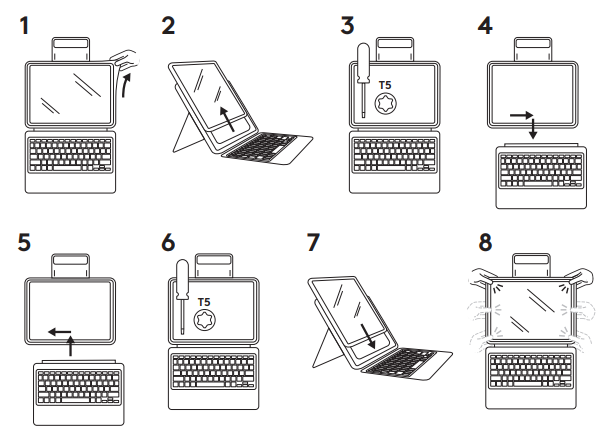
Remove the iPad from the holder.
- Removing your iPad from the Rugged Combo 4 / Touch holder is easiest when started from the top left corner — near the power button. Slide the holder back, off the iPad and then move your way to the top right corner. Once the top has been removed the bottom will slide out easily.
- Using a star head, T5 sized screwdriver, remove the single screw located inside the spine.
- Slide the keyboard to the right about 1cm which will allow it to be pulled down and detach.
- Align the spine of the new keyboard with the holder and push up, then slide left.
- Replace the screw
- Insert the iPad into the holder again.
Important Notice: The Firmware Update Tool is no longer supported or maintained by Logitech. We highly recommend using Logi Options+ for your supported Logitech devices. We are here to assist you during this transition.
Important Notice: The Logitech Preference Manager is no longer supported or maintained by Logitech. We highly recommend using Logi Options+ for your supported Logitech devices. We are here to assist you during this transition.
Important Notice: The Logitech Control Center is no longer supported or maintained by Logitech. We highly recommend using Logi Options+ for your supported Logitech devices. We are here to assist you during this transition.
Important Notice: The Logitech Connection Utility is no longer supported or maintained by Logitech. We highly recommend using Logi Options+ for your supported Logitech devices. We are here to assist you during this transition.
Important Notice: The Unifying Software is no longer supported or maintained by Logitech. We highly recommend using Logi Options+ for your supported Logitech devices. We are here to assist you during this transition.
Important Notice: The SetPoint software is no longer supported or maintained by Logitech. We highly recommend using Logi Options+ for your supported Logitech devices. We are here to assist you during this transition.
Frequently Asked Questions
There are no products available for this section
There are no Downloads for this Product
There are no Downloads for this Version
Compatible Product
