Your earbuds come fitted with medium sized round silicone ear tips and size 2 ear fins to give you a secure and comfortable fit.
If you don’t get a secure fit out of the box, try different combinations of ear tips and fins.
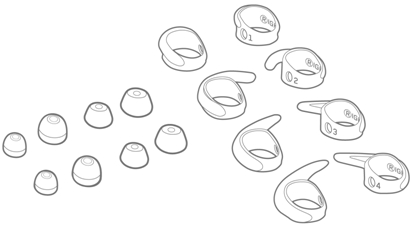
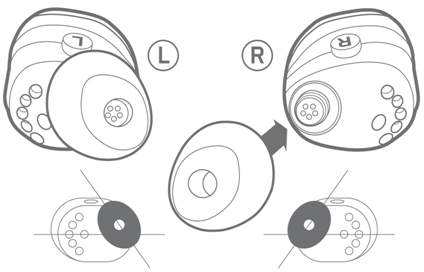
To change the ear tips:
- Remove the ear tip.
- Replace with an alternative ear tip. Small round silicone tips and small and medium oval silicone tips are provided as alternatives.
- Your ears may not be the same size, make sure you try different sized ear tips for left and right if needed.
- Try the small oval silicone tips if you have a small ear canal or if you find the small round silicone tips too big.
- If using the oval ear-tips, install them on an angle as shown below to align with the natural shape of your ear canal.
To change the ear fins:
- Remove the ear fin from the earbud.
- Replace the ear fin with an alternative ear fin. Size 1, 3, and 4 fins are provided as alternatives. Left and Right markings can be found on the earbud as well as the inside of each ear fin.
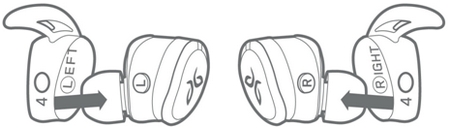
- Make sure the ear fin is secured all the way onto the earbud.
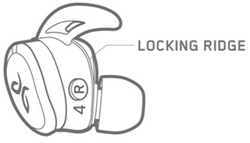
- The curve of the ear fin should point towards your ear.
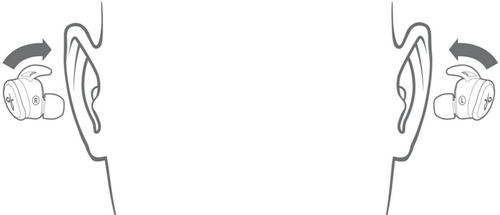
- Once you’ve installed your preferred ear fins, place your earbuds into each ear and run wild.
- Your ears may not be the same size, so make sure you try different sized ear fins in each ear if needed.
- The ear fin should feel secure against the inner bowl of your ear.
Ear fins must be installed when placing Jaybird RUN in the charging case.
Wearing your Jaybird RUN earbuds
Once you have your preferred ear tips and fins, place your RUN buds into each ear and run wild.
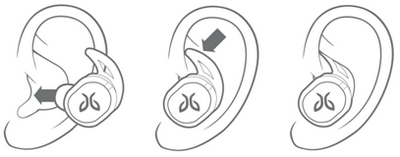
- Getting the best fit:
- Your earbuds should feel secure in your ears. If you feel too much pressure anywhere on your ear, try a different ear tip or ear fin.
- Gently shake your head left to right to make sure your earbuds are secure.
- Once fitted well, you should notice some isolation from surrounding noise.

Important Notice: The Firmware Update Tool is no longer supported or maintained by Logitech. We highly recommend using Logi Options+ for your supported Logitech devices. We are here to assist you during this transition.
Important Notice: The Logitech Preference Manager is no longer supported or maintained by Logitech. We highly recommend using Logi Options+ for your supported Logitech devices. We are here to assist you during this transition.
Important Notice: The Logitech Control Center is no longer supported or maintained by Logitech. We highly recommend using Logi Options+ for your supported Logitech devices. We are here to assist you during this transition.
Important Notice: The Logitech Connection Utility is no longer supported or maintained by Logitech. We highly recommend using Logi Options+ for your supported Logitech devices. We are here to assist you during this transition.
Important Notice: The Unifying Software is no longer supported or maintained by Logitech. We highly recommend using Logi Options+ for your supported Logitech devices. We are here to assist you during this transition.
Important Notice: The SetPoint software is no longer supported or maintained by Logitech. We highly recommend using Logi Options+ for your supported Logitech devices. We are here to assist you during this transition.
Frequently Asked Questions
There are no products available for this section
There are no Downloads for this Product
There are no Downloads for this Version
Compatible Product
