This article applies to the following products:
All Harmony Remotes
This article applies to the following platforms:
Windows XP
Windows Vista
Windows 7
Mac OS 10.3 and above
Cause
When you log in to your account using the remote control software, your IP address is automatically assigned a session ID. Some Internet Service Providers (ISPs) refresh customer IP addresses every 5 minutes or so. When the IP address is refreshed, the remote control software session ID expires and you are automatically logged out.
Solution
To prevent your IP address from automatically refreshing, contact your Internet Service Provider (ISP) and ask them for the:
- Proxy Host
- Proxy Port
- User name (may be required to change proxy settings)
- Password (may be required to change proxy settings)
Once you have this information from your Internet service provider, :
- Right-click the Harmony "H" icon in the system tray and click Preferences.
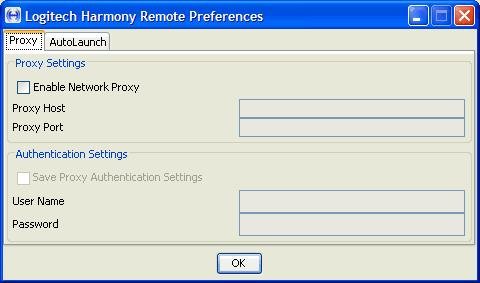
- Click the Proxy tab.
- Select Enable Network Proxy.
- Enter the Proxy Host information.
- Enter the Proxy Port information.
- Enter the User Name and Password, if required by your ISP.
- Select Save Proxy Authentication Settings.
- Click OK.
For customers in South Africa, we have already identified the proxy information you must use to prevent automatic logout from the remote control software.
- Proxy Host: dsl-cache.saix.net
- Proxy Port: 8080
- User Name and Password: No Authentication required.
For customers in Singapore, we have already identified the proxy information you must use to prevent automatic logout from the remote control software.
- Proxy Host: proxy.singnet.com.sg
- Proxy Port: 8080
- User Name and Password: No Authentication required
Important Notice: The Firmware Update Tool is no longer supported or maintained by Logitech. We highly recommend using Logi Options+ for your supported Logitech devices. We are here to assist you during this transition.
Important Notice: The Logitech Preference Manager is no longer supported or maintained by Logitech. We highly recommend using Logi Options+ for your supported Logitech devices. We are here to assist you during this transition.
Important Notice: The Logitech Control Center is no longer supported or maintained by Logitech. We highly recommend using Logi Options+ for your supported Logitech devices. We are here to assist you during this transition.
Important Notice: The Logitech Connection Utility is no longer supported or maintained by Logitech. We highly recommend using Logi Options+ for your supported Logitech devices. We are here to assist you during this transition.
Important Notice: The Unifying Software is no longer supported or maintained by Logitech. We highly recommend using Logi Options+ for your supported Logitech devices. We are here to assist you during this transition.
Important Notice: The SetPoint software is no longer supported or maintained by Logitech. We highly recommend using Logi Options+ for your supported Logitech devices. We are here to assist you during this transition.
Frequently Asked Questions
There are no products available for this section
There are no Downloads for this Product
There are no Downloads for this Version
Compatible Product
