The inline remote control can be used for the following:
NOTE: The inline remote control microphone is only supported on iPods and iPhones that have voice-recording capabilities.
Listening to music
NOTE: Volume and track controls are only available for iPods and iPhones.
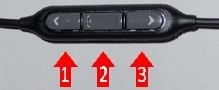
When you're listening to music, the buttons (numbered in the image above) have the following functions:
-
Volume up
-
The number of button presses determines the function:
-
One button press: Play/Pause
-
Two quick button presses: Next Track
-
Three quick button presses: Previous Track
-
-
Volume down
Taking a phone call
NOTE: The following functions are only available for iPhones.
For phone calls, the buttons (numbered in the image above) function as follows:
-
During an incoming call:
-
Silence ringer
-
Answer call
-
Silence ringer
-
-
On a call:
-
Call volume up
-
Hang up call
-
Call volume down
-
-
When idle and not on a call:
-
Ringer volume up
-
N/A
-
Ringer volume down
-
Important Notice: The Firmware Update Tool is no longer supported or maintained by Logitech. We highly recommend using Logi Options+ for your supported Logitech devices. We are here to assist you during this transition.
Important Notice: The Logitech Preference Manager is no longer supported or maintained by Logitech. We highly recommend using Logi Options+ for your supported Logitech devices. We are here to assist you during this transition.
Important Notice: The Logitech Control Center is no longer supported or maintained by Logitech. We highly recommend using Logi Options+ for your supported Logitech devices. We are here to assist you during this transition.
Important Notice: The Logitech Connection Utility is no longer supported or maintained by Logitech. We highly recommend using Logi Options+ for your supported Logitech devices. We are here to assist you during this transition.
Important Notice: The Unifying Software is no longer supported or maintained by Logitech. We highly recommend using Logi Options+ for your supported Logitech devices. We are here to assist you during this transition.
Important Notice: The SetPoint software is no longer supported or maintained by Logitech. We highly recommend using Logi Options+ for your supported Logitech devices. We are here to assist you during this transition.
Frequently Asked Questions
There are no products available for this section
There are no Downloads for this Product
There are no Downloads for this Version
Compatible Product
