To uninstall SetPoint, please do the following:
-
Go to Add or Remove Programs:
- Start menu view: Start > Control Panel > Add/Remove Programs
- Classic start menu view: Start > Settings >Control Panel > Add/Remove Programs
-
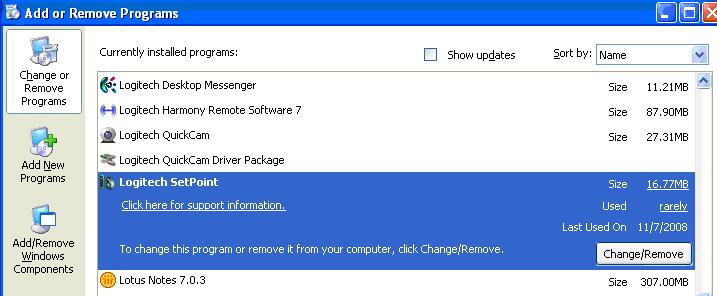
Open Add or Remove Programs.
-
Select Logitech SetPoint from the list of programs displayed (shown below):
-
Click the Change / Remove button and follow the on-screen instructions to uninstall SetPoint.
-
Go to Uninstall a program:
- Start menu view: Start > Control Panel > Uninstall a program
- Classic start menu view: Start > Settings >Control Panel > Programs and Features > Uninstall a program
-
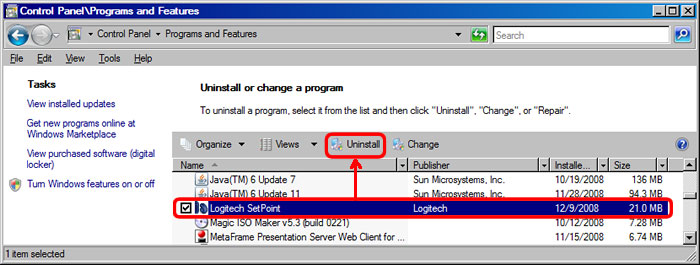
Select Logitech SetPoint from the list of programs displayed as shown below:
-
Click the Uninstall button highlighted above and follow the on-screen instructions to uninstall SetPoint.
-
Go to Uninstall a program (Start > Control Panel > Uninstall a program):
-
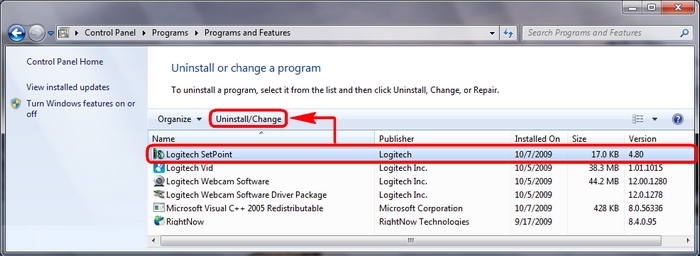
Select Logitech SetPoint from the list of programs displayed as shown below:
-
Click the Uninstall button highlighted above and follow the on-screen instructions to uninstall SetPoint.
Important Notice: The Firmware Update Tool is no longer supported or maintained by Logitech. We highly recommend using Logi Options+ for your supported Logitech devices. We are here to assist you during this transition.
Important Notice: The Logitech Preference Manager is no longer supported or maintained by Logitech. We highly recommend using Logi Options+ for your supported Logitech devices. We are here to assist you during this transition.
Important Notice: The Logitech Control Center is no longer supported or maintained by Logitech. We highly recommend using Logi Options+ for your supported Logitech devices. We are here to assist you during this transition.
Important Notice: The Logitech Connection Utility is no longer supported or maintained by Logitech. We highly recommend using Logi Options+ for your supported Logitech devices. We are here to assist you during this transition.
Important Notice: The Unifying Software is no longer supported or maintained by Logitech. We highly recommend using Logi Options+ for your supported Logitech devices. We are here to assist you during this transition.
Important Notice: The SetPoint software is no longer supported or maintained by Logitech. We highly recommend using Logi Options+ for your supported Logitech devices. We are here to assist you during this transition.
Frequently Asked Questions
There are no products available for this section
There are no Downloads for this Product
There are no Downloads for this Version
Compatible Product
