There are no Documents available for this Product. If you have questions, browse the topics on the left.
There are no Spare Parts available for this Product
There are no videos available for this product
There are no FAQs for this Software.
There are no Documents available for this Software. If you have questions, browse the topics on the left.
There are no Videos available for this Software.
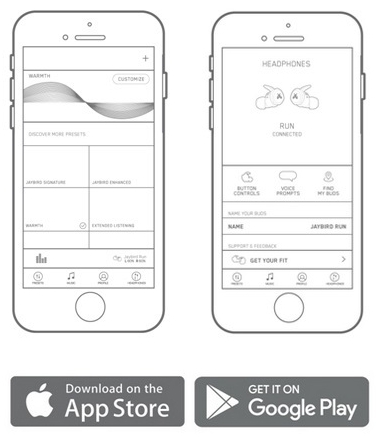
The Jaybird app gives you the ability to customize the sound profile of your Jaybird RUN earbuds in real time. You can access customized presets created by the Jaybird team as well as many others from Jaybird Athletes. You also have the ability to create your own sound profile and save it by using the custom equalizer. If you think you have created the perfect sound profile, share it with the Jaybird Community and watch as people from around the world save and use your preset.
Additionally, you can use the Jaybird app to find running playlists, adjust your Jaybird RUN button functions and voice prompts, Find Your Buds, reach out to us for support, and give us feedback.
Important Notice: Logitech Options has reached end of support and is no longer maintained. For the best experience with your supported Logitech devices, we recommend switching to Logi Options+, our next-generation customization software. Our team is here to help you during this transition.
Important Notice: The Presentation software is no longer supported or maintained by Logitech. Logitech Presentation devices are now supported by Logi Options+ for a better experience. We highly recommend using Logi Options+ with your presentation remotes. We are here to assist you during this transition.
Important Notice: The Firmware Update Tool is no longer supported or maintained by Logitech. We highly recommend using Logi Options+ for your supported Logitech devices. We are here to assist you during this transition.
Important Notice: The Logitech Preference Manager is no longer supported or maintained by Logitech. We highly recommend using Logi Options+ for your supported Logitech devices. We are here to assist you during this transition.
Important Notice: The Logitech Control Center is no longer supported or maintained by Logitech. We highly recommend using Logi Options+ for your supported Logitech devices. We are here to assist you during this transition.
Important Notice: The Logitech Connection Utility is no longer supported or maintained by Logitech. We highly recommend using Logi Options+ for your supported Logitech devices. We are here to assist you during this transition.
Important Notice: The Unifying Software is no longer supported or maintained by Logitech. We highly recommend using Logi Options+ for your supported Logitech devices. We are here to assist you during this transition.
Important Notice: The SetPoint software is no longer supported or maintained by Logitech. We highly recommend using Logi Options+ for your supported Logitech devices. We are here to assist you during this transition.
Frequently Asked Questions
There are no products available for this section
There are no Downloads for this Product
Onboard Memory Manager is out of date. Please update to the most recent release.
Select Operating System to show Downloads.
There are no Downloads for Operating Systems not listed.