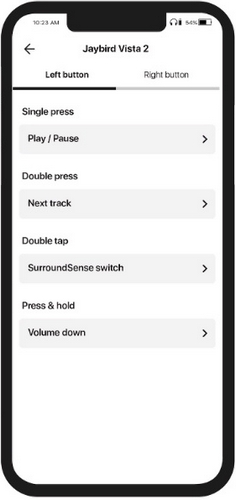
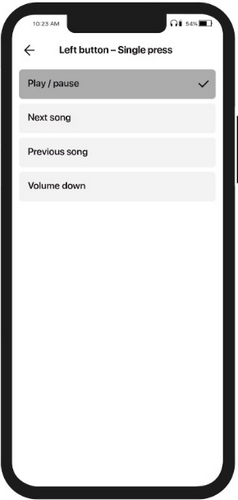
You can customize each of the multi-function button functionality by using the Jaybird App. There you can replace the default controls with the voice assistant and other preferred controls options.
To customize the functionality of your Jaybird Vista 2 earbuds multi-function buttons:
- Download and install the Jaybird App.
- Open the Jaybird App on your phone.
- Navigate to Button Controls.
- On the Button Controls screen you can customize each multi-function button functionality by selecting your preferred action.
Please note that regardless of how you have customized the multi-function buttons, your earbuds automatically turn off when you put them in the charging case and close it. Your earbuds will automatically turn on when you open the charging case.
Important Notice: The Firmware Update Tool is no longer supported or maintained by Logitech. We highly recommend using Logi Options+ for your supported Logitech devices. We are here to assist you during this transition.
Important Notice: The Logitech Preference Manager is no longer supported or maintained by Logitech. We highly recommend using Logi Options+ for your supported Logitech devices. We are here to assist you during this transition.
Important Notice: The Logitech Control Center is no longer supported or maintained by Logitech. We highly recommend using Logi Options+ for your supported Logitech devices. We are here to assist you during this transition.
Important Notice: The Logitech Connection Utility is no longer supported or maintained by Logitech. We highly recommend using Logi Options+ for your supported Logitech devices. We are here to assist you during this transition.
Important Notice: The Unifying Software is no longer supported or maintained by Logitech. We highly recommend using Logi Options+ for your supported Logitech devices. We are here to assist you during this transition.
Important Notice: The SetPoint software is no longer supported or maintained by Logitech. We highly recommend using Logi Options+ for your supported Logitech devices. We are here to assist you during this transition.
Frequently Asked Questions
There are no products available for this section
There are no Downloads for this Product
There are no Downloads for this Version
Compatible Product
