You can adjust the length of the cord with the attached speed cinch or included shirt clip.
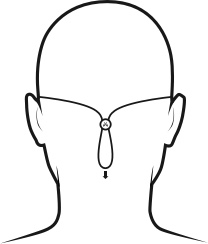
The speed cinch is designed for those wanting a great sports music experience. It helps to keep the cord off your neck and shoulders. To adjust the speed cinch, follow these steps:
- Put the Tarah earbuds in your ears.
- Grab the cord beneath the cinch with one hand. With your other hand adjust the cinch up or down until you find the right cord length to get a snug fit with no excessive slack.
For more detailed instructions on how to attach the cinch to the cord please see “HOW DO I USE THE SPEED CINCH SO IT DOES NOT FALL OFF THE CORD?”
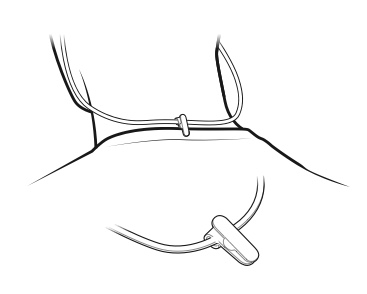
- Before using the shirt clip, remove the cinch if necessary.
- Attach the shirt clip to the cord and then to the back of your shirt as shown below.
Once you are happy with the fit, you are good to go.
Aviso importante: Logitech ya no ofrece asistencia ni mantenimiento para Firmware Update Tool. Recomendamos encarecidamente el uso de Logi Options+ para los dispositivos Logitech compatibles. Estamos aquí para ayudarte durante esta transición.
Aviso importante: Logitech ya no ofrece asistencia ni mantenimiento para Logitech Preference Manager. Recomendamos encarecidamente el uso de Logi Options+ para los dispositivos Logitech compatibles. Estamos aquí para ayudarte durante esta transición.
Aviso importante: Logitech ya no ofrece asistencia ni mantenimiento para Logitech Control Center. Recomendamos encarecidamente el uso de Logi Options+ para los dispositivos Logitech compatibles. Estamos aquí para ayudarte durante esta transición.
Aviso importante: Logitech ya no ofrece asistencia ni mantenimiento para Logitech Connection Utility. Recomendamos encarecidamente el uso de Logi Options+ para los dispositivos Logitech compatibles. Estamos aquí para ayudarte durante esta transición.
Aviso importante: Logitech ya no ofrece asistencia ni mantenimiento para el software Unifying. Recomendamos encarecidamente el uso de Logi Options+ para los dispositivos Logitech compatibles. Estamos aquí para ayudarte durante esta transición.
Aviso importante: Logitech ya no ofrece asistencia ni mantenimiento para el software SetPoint. Recomendamos encarecidamente el uso de Logi Options+ para los dispositivos Logitech compatibles. Estamos aquí para ayudarte durante esta transición.
Preguntas más frecuentes
No hay productos disponibles para esta sección
No hay descargas para este producto
No hay descargas para esta versión.
Compatible Product
