In DirectInput mode, you can program the mouselook functionality to a thumbstick. Here's how:
NOTE: See Knowledge Base article 360023236454 for more information about input modes.
-
Create a new game profile. For instructions, see Knowledge Base article 360023236454
-
Go to Start > Programs > Logitech > Logitech Gaming Software.
-
Go to Profile > Edit… and choose your new game profile.
-
Select the thumbstick you want to assign the mouselook function to. Most people use the right thumbstick.
-
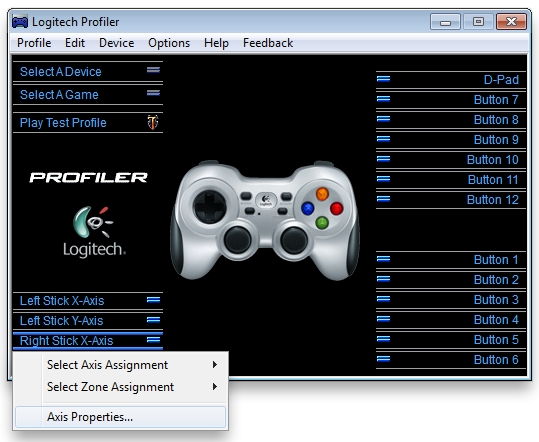
Choose Right Stick X-Axis > Axis Properties, as shown below.
-
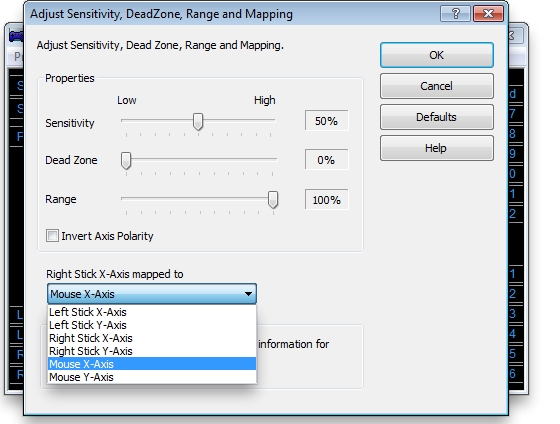
In the new window that opens (shown below), select "Mouse X-Axis" and click OK.
-
Repeat steps 5 - 6, but select Left Stick Y-Axis > Axis Properties.
-
Choose "Mouse Y-Axis" and click OK. Your mouselook function should now be mapped to your right thumbstick.
Contact information
If the above solutions do not resolve the issue, please see Knowledge Base article 21368 for instructions on contacting Logitech Technical Support.
Aviso importante: Logitech ya no ofrece asistencia ni mantenimiento para la herramienta de actualización de firmware. Le recomendamos usar Logi Options+ para poner al día sus dispositivos Logitech compatibles. Estamos aquí para ayudarle durante esta transición.
Aviso importante: Logitech ya no ofrece asistencia ni mantenimiento para Logitech Preference Manager. Le recomendamos usar Logi Options+ para poner al día sus dispositivos Logitech compatibles. Estamos aquí para ayudarle durante esta transición.
Aviso importante: Logitech ya no ofrece asistencia ni mantenimiento para Logitech Control Center. Le recomendamos usar Logi Options+ para poner al día sus dispositivos Logitech compatibles. Estamos aquí para ayudarle durante esta transición.
Aviso importante: Logitech ya no ofrece asistencia ni mantenimiento para Logitech Connection Utility. Le recomendamos usar Logi Options+ para poner al día sus dispositivos Logitech compatibles. Estamos aquí para ayudarle durante esta transición.
Aviso importante: Logitech ya no ofrece asistencia ni mantenimiento para el software Unifying. Le recomendamos usar Logi Options+ para poner al día sus dispositivos Logitech compatibles. Estamos aquí para ayudarle durante esta transición.
Aviso importante: Logitech ya no ofrece asistencia ni mantenimiento para el software SetPoint. Le recomendamos usar Logi Options+ para poner al día sus dispositivos Logitech compatibles. Estamos aquí para ayudarle durante esta transición.
Preguntas más frecuentes
No hay productos disponibles para esta sección
No hay descargas para este producto
No hay descargas para esta versión.
Compatible Product
