To switch from the USB receiver to Bluetooth, simply play audio on the connected Bluetooth device.
Audio will start playing automatically as the Bluetooth connection takes priority over the USB receiver.
To switch from Bluetooth to the USB receiver:
- Since the Bluetooth connection takes priority over the receiver, pause the audio on the connected Bluetooth device.
- Then, play audio on the device connected to the receiver.
Based on your preference, you can select when to let Bluetooth connected devices take priority over the receiver connected device on the Logi Tune app.
On the Logi Tune app, go to Connected Devices and click the Setting icon  next to Bluetooth connected devices.
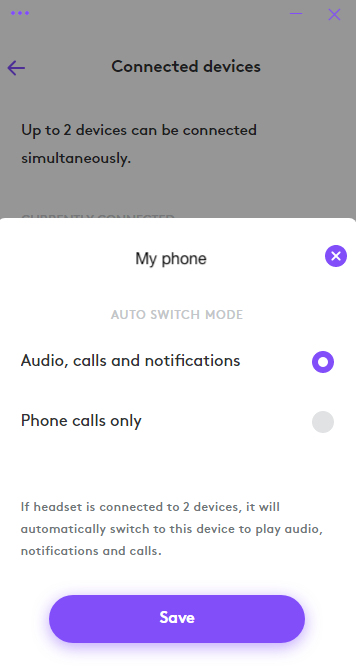
- If you select Audio, calls and notifications, the Bluetooth connected device will override the receiver connected device when there are audio, calls and notifications on the Bluetooth connected device.
- If you select Phone calls only, the Bluetooth connected device will only override the receiver connected device when there is a call on the Bluetooth connected device.
This setting will be defaulted to Audio, calls and notifications every time the headset powers off.
Tärkeä huomautus: Logitech ei enää tue tai ylläpidä laiteohjelmistopäivitystyökalua. Suosittelemme käyttämään Logi Options+-sovellusta tuetuilla Logitech-laitteilla . Saat meiltä apua siirtymävaiheessa.
Tärkeä huomautus: Logitech ei enää tue tai ylläpidä Logitech Preference Manageria. Suosittelemme käyttämään Logi Options+-sovellusta tuetuilla Logitech-laitteilla . Saat meiltä apua siirtymävaiheessa.
Tärkeä huomautus: Logitech ei enää tue tai ylläpidä Logitech Control Centeriä. Suosittelemme käyttämään Logi Options+-sovellusta tuetuilla Logitech-laitteilla . Saat meiltä apua siirtymävaiheessa.
Tärkeä huomautus: Logitech ei enää tue tai ylläpidä Logitechin yhteydenmuodostusohjelmaa. Suosittelemme käyttämään Logi Options+-sovellusta tuetuilla Logitech-laitteilla . Saat meiltä apua siirtymävaiheessa.
Tärkeä huomautus: Logitech ei enää tue tai ylläpidä Unifying-ohjelmistoa. Suosittelemme käyttämään Logi Options+-sovellusta tuetuilla Logitech-laitteilla . Saat meiltä apua siirtymävaiheessa.
Tärkeä huomautus: Logitech ei enää tue tai ylläpidä SetPoint-ohjelmistoa. Suosittelemme käyttämään Logi Options+-sovellusta tuetuilla Logitech-laitteilla . Saat meiltä apua siirtymävaiheessa.
Usein esitetyt kysymykset
Tälle osastolle ei ole saatavilla tuotteita
Tuotteelle ei ole latauksia
Versiolle ei ole latauksia.
Compatible Product
