If you see a warning message while you record, it’s because your video is at risk of lagging or dropping frames due to not enough processing power in your computer. We recommend that you:
- Close all other applications that are running.
- Connect your laptop to its power source.
- Lower the resolution and frames per second (FPS).
Please review the recommended computer specifications to make sure your computer is adequate for recording at higher resolutions and frame rates.
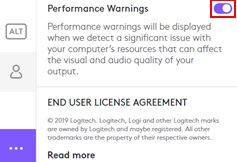
You can turn off these notifications by navigating to the About menu and switching the Performance Warnings toggle OFF.
Tärkeä huomautus: Logitech ei enää tue tai ylläpidä laiteohjelmistopäivitystyökalua. Suosittelemme käyttämään Logi Options+-sovellusta tuetuilla Logitech-laitteilla . Saat meiltä apua siirtymävaiheessa.
Tärkeä huomautus: Logitech ei enää tue tai ylläpidä Logitech Preference Manageria. Suosittelemme käyttämään Logi Options+-sovellusta tuetuilla Logitech-laitteilla . Saat meiltä apua siirtymävaiheessa.
Tärkeä huomautus: Logitech ei enää tue tai ylläpidä Logitech Control Centeriä. Suosittelemme käyttämään Logi Options+-sovellusta tuetuilla Logitech-laitteilla . Saat meiltä apua siirtymävaiheessa.
Tärkeä huomautus: Logitech ei enää tue tai ylläpidä Logitechin yhteydenmuodostusohjelmaa. Suosittelemme käyttämään Logi Options+-sovellusta tuetuilla Logitech-laitteilla . Saat meiltä apua siirtymävaiheessa.
Tärkeä huomautus: Logitech ei enää tue tai ylläpidä Unifying-ohjelmistoa. Suosittelemme käyttämään Logi Options+-sovellusta tuetuilla Logitech-laitteilla . Saat meiltä apua siirtymävaiheessa.
Tärkeä huomautus: Logitech ei enää tue tai ylläpidä SetPoint-ohjelmistoa. Suosittelemme käyttämään Logi Options+-sovellusta tuetuilla Logitech-laitteilla . Saat meiltä apua siirtymävaiheessa.
Usein esitetyt kysymykset
Tälle osastolle ei ole saatavilla tuotteita
Tuotteelle ei ole latauksia
Versiolle ei ole latauksia.
Compatible Product
