You can adjust the length of the cord with the attached speed cinch or included shirt clip.
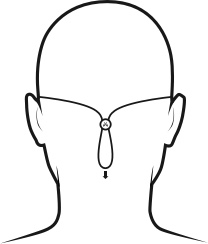
The speed cinch is designed for those wanting a great sports music experience. It helps to keep the cord off your neck and shoulders. To adjust the speed cinch, follow these steps:
- Put the Tarah earbuds in your ears.
- Grab the cord beneath the cinch with one hand. With your other hand adjust the cinch up or down until you find the right cord length to get a snug fit with no excessive slack.
For more detailed instructions on how to attach the cinch to the cord please see “HOW DO I USE THE SPEED CINCH SO IT DOES NOT FALL OFF THE CORD?”
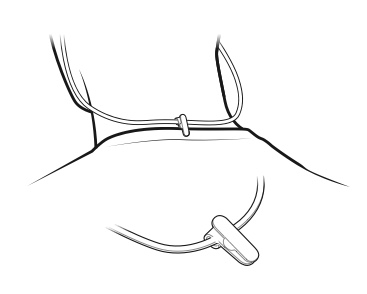
- Before using the shirt clip, remove the cinch if necessary.
- Attach the shirt clip to the cord and then to the back of your shirt as shown below.
Once you are happy with the fit, you are good to go.
Fontos figyelmeztetés: A Logitech már nem támogatja a Firmware Update Tool alkalmazást, és frissítéseket sem ad ki hozzá. Erősen javasoljuk a Logi Options+ használatát atámogatott Logitech-eszközeihez Szívesen segítünk Önnek az átmenet során.
Fontos figyelmeztetés: A Logitech már nem támogatja a Preference Manager alkalmazást, és frissítéseket sem ad ki hozzá. Erősen javasoljuk a Logi Options+ használatát atámogatott Logitech-eszközeihez Szívesen segítünk Önnek az átmenet során.
Fontos figyelmeztetés: A Logitech már nem támogatja a Control Center alkalmazást, és frissítéseket sem ad ki hozzá. Erősen javasoljuk a Logi Options+ használatát atámogatott Logitech-eszközeihez Szívesen segítünk Önnek az átmenet során.
Fontos figyelmeztetés: A Logitech már nem támogatja a Connection Utility alkalmazást, és frissítéseket sem ad ki hozzá. Erősen javasoljuk a Logi Options+ használatát atámogatott Logitech-eszközeihez Szívesen segítünk Önnek az átmenet során.
Fontos figyelmeztetés: A Logitech már nem támogatja a Unifying szoftvert, és frissítéseket sem ad ki hozzá. Erősen javasoljuk a Logi Options+ használatát atámogatott Logitech-eszközeihez Szívesen segítünk Önnek az átmenet során.
Fontos figyelmeztetés: A Logitech már nem támogatja és nem tartja karban a SetPoint szoftvert. Erősen javasoljuk a Logi Options+ használatát atámogatott Logitech-eszközeihez Szívesen segítünk Önnek az átmenet során.
Gyakori kérdések
Ehhez a szakaszhoz nincsenek elérhető termékek
Nincs letöltés ehhez a termékhez
Ehhez a verzióhoz nincsenek letöltések.
Compatible Product
