Supported Software
MX Creative Console is supported in the latest Version of the Logi Options+ App and can be downloaded here.
Compatible Version
The MX Creative Console is compatible with Logi Options+ version 1.83 and later. It is compatible with the following operating systems:
- Windows 10 and later (Note: Windows systems with ARM 64 processors are not supported)
- macOS 13 and later
What languages are available in Logi Options+? Can I change the language?
Logi Options+ supports 19 languages, but some languages may not be available for the MX Creative Console configurator. We currently support English, French, German, Japanese, Italian, and Spanish.
Other languages are available for other devices supported by Logi Options+. You can select your preference in the software settings:
- On your computer, open Logi Options+.
- Access Settings — look for the Settings option (gear icon) in the right top corner of the home page of Logi Options+ app.
- Language Settings — in the Settings window, locate the language options. Use the dropdown menu to select your desired language.
- The changes will be reflected immediately once you have changed the language.
What happens if I uninstall Logi Options+?
Logitech software is required to support the use of the MX Creative Console. If you uninstall the Logi Options+ app, you will only be able to use a very limited set of basic actions for the dialpad. The Keypad cannot be used without Logi Options+.
What is the Logi Plugin Service?
The Logi Plugin Service is managing all the system that powers the MX Creative Console, including all the plugins and the marketplace. Not that this service is only being activated if you connected the MX Creative Console to your computer. In the future, we will expand the ability for the Logi Plugin Service to support more devices.
How do I create a Logi ID account?
There are several ways to create a Logi ID account. The easiest is to click on the Account icon in the top right corner of the main app.
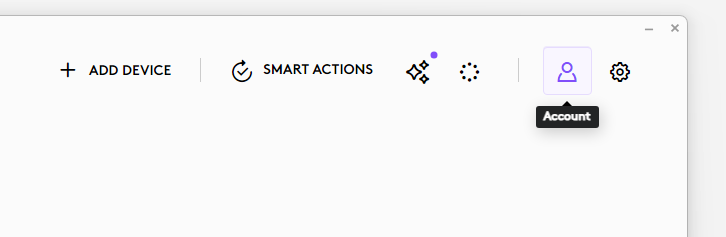
You will be prompted to login:
- During the Device Feature tour
- Whenever you will click on the INSTALL button of any profile or plugin from the Marketplace
- When you add a new profile for an application.
You can use the device with the default profile and all other actions from the system plugin (which is pre-installed). However, in order to download other plugins or install any other application profile, you’ll need to be logged in with your Logi ID.
Pemberitahuan Penting: Alat Pembaruan Firmware tidak lagi didukung atau dikelola oleh Logitech. Kami sangat merekomendasikan penggunaan Logi Options+ untuk perangkat Logitech yang didukung. Kami siap membantu Anda selama masa transisi ini.
Pemberitahuan Penting: Manajer Preferensi Logitech tidak lagi didukung atau dikelola oleh Logitech. Kami sangat merekomendasikan penggunaan Logi Options+ untuk perangkat Logitech yang didukung. Kami siap membantu Anda selama masa transisi ini.
Pemberitahuan Penting: Logitech Control Center tidak lagi didukung atau dikelola oleh Logitech. Kami sangat merekomendasikan penggunaan Logi Options+ untuk perangkat Logitech yang didukung. Kami siap membantu Anda selama masa transisi ini.
Pemberitahuan Penting: Utilitas Koneksi Logitech tidak lagi didukung atau dikelola oleh Logitech. Kami sangat merekomendasikan penggunaan Logi Options+ untuk perangkat Logitech yang didukung. Kami siap membantu Anda selama masa transisi ini.
Pemberitahuan Penting: Perangkat Lunak Unifying tidak lagi didukung atau dipelihara oleh Logitech. Kami sangat merekomendasikan penggunaan Logi Options+ untuk perangkat Logitech yang didukung. Kami siap membantu Anda selama masa transisi ini.
Pemberitahuan Penting: Perangkat lunak SetPoint tidak lagi didukung atau dipelihara oleh Logitech. Kami sangat merekomendasikan penggunaan Logi Options+ untuk perangkat Logitech yang didukung. Kami siap membantu Anda selama masa transisi ini.
Frequently Asked Questions
Tidak ada produk yang tersedia untuk bagian ini
Tidak ada Unduhan untuk Produk ini
Tidak ada Unduhan untuk Versi ini.
Compatible Product
