To switch from the USB receiver to Bluetooth, simply play audio on the connected Bluetooth device.
Audio will start playing automatically as the Bluetooth connection takes priority over the USB receiver.
To switch from Bluetooth to the USB receiver:
- Since the Bluetooth connection takes priority over the receiver, pause the audio on the connected Bluetooth device.
- Then, play audio on the device connected to the receiver.
Based on your preference, you can select when to let Bluetooth connected devices take priority over the receiver connected device on the Logi Tune app.
On the Logi Tune app, go to Connected Devices and click the Setting icon  next to Bluetooth connected devices.
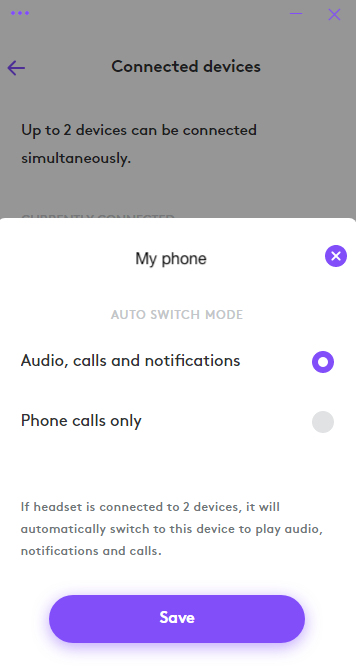
- If you select Audio, calls and notifications, the Bluetooth connected device will override the receiver connected device when there are audio, calls and notifications on the Bluetooth connected device.
- If you select Phone calls only, the Bluetooth connected device will only override the receiver connected device when there is a call on the Bluetooth connected device.
This setting will be defaulted to Audio, calls and notifications every time the headset powers off.
Pemberitahuan Penting: Alat Pembaruan Firmware tidak lagi didukung atau dikelola oleh Logitech. Kami sangat merekomendasikan penggunaan Logi Options+ untuk perangkat Logitech yang didukung. Kami siap membantu Anda selama masa transisi ini.
Pemberitahuan Penting: Manajer Preferensi Logitech tidak lagi didukung atau dikelola oleh Logitech. Kami sangat merekomendasikan penggunaan Logi Options+ untuk perangkat Logitech yang didukung. Kami siap membantu Anda selama masa transisi ini.
Pemberitahuan Penting: Logitech Control Center tidak lagi didukung atau dikelola oleh Logitech. Kami sangat merekomendasikan penggunaan Logi Options+ untuk perangkat Logitech yang didukung. Kami siap membantu Anda selama masa transisi ini.
Pemberitahuan Penting: Utilitas Koneksi Logitech tidak lagi didukung atau dikelola oleh Logitech. Kami sangat merekomendasikan penggunaan Logi Options+ untuk perangkat Logitech yang didukung. Kami siap membantu Anda selama masa transisi ini.
Pemberitahuan Penting: Perangkat Lunak Unifying tidak lagi didukung atau dipelihara oleh Logitech. Kami sangat merekomendasikan penggunaan Logi Options+ untuk perangkat Logitech yang didukung. Kami siap membantu Anda selama masa transisi ini.
Pemberitahuan Penting: Perangkat lunak SetPoint tidak lagi didukung atau dipelihara oleh Logitech. Kami sangat merekomendasikan penggunaan Logi Options+ untuk perangkat Logitech yang didukung. Kami siap membantu Anda selama masa transisi ini.
Frequently Asked Questions
Tidak ada produk yang tersedia untuk bagian ini
Tidak ada Unduhan untuk Produk ini
Tidak ada Unduhan untuk Versi ini.
Compatible Product
