If your touchpad becomes unresponsive, do the following:
- Check if the device is connected to your computer:
- To check your Bluetooth connection: Open the Bluetooth settings in your computer and check if the touchpad shows as Connected. More information can be found here.
- To check your Logi Bolt connection: Open the Logi Options+ app in your computer and check if the touchpad shows as Connected. More information can be found here.
- Make sure the device has sufficient battery charge. To check the charge, look for the LED in the right top corner of the touchpad — it should be green.
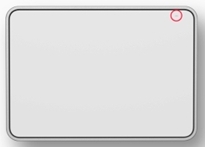
You can also use the Logi Options+ app: Open the Logi Options+ app in your computer and check the battery level on the home page.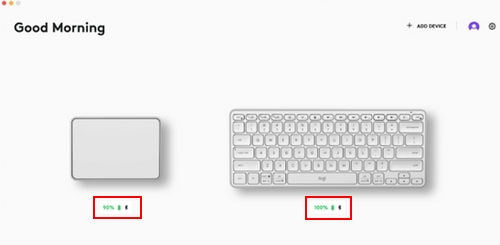
- Turn the touchpad off and then turn it on again without touching the glass surface
If the issue persists, please contact Customer Support.
Nota importante: lo strumento di aggiornamento del firmware non è più supportato o gestito da Logitech. Si consiglia vivamente di utilizzare Logi Options+ per i dispositivi Logitech supportati. Siamo qui per assisterti durante questa transizione.
Nota importante: Logitech Preference Manager non è più supportato o gestito da Logitech. Si consiglia vivamente di utilizzare Logi Options+ per i dispositivi Logitech supportati. Siamo qui per assisterti durante questa transizione.
Nota importante: Logitech Control Center non è più supportato o gestito da Logitech. Si consiglia vivamente di utilizzare Logi Options+ per i dispositivi Logitech supportati. Siamo qui per assisterti durante questa transizione.
Nota importante: l'utilità di connessione Logitech non è più supportata o gestita da Logitech. Si consiglia vivamente di utilizzare Logi Options+ per i dispositivi Logitech supportati. Siamo qui per assisterti durante questa transizione.
Nota importante: il software Unifying non è più supportato o gestito da Logitech. Si consiglia vivamente di utilizzare Logi Options+ per i dispositivi Logitech supportati. Siamo qui per assisterti durante questa transizione.
Nota importante: Il software SetPoint non è più supportato o gestito da Logitech. Si consiglia vivamente di utilizzare Logi Options+ per i dispositivi Logitech supportati. Siamo qui per assisterti durante questa transizione.
Domande frequenti
Non ci sono prodotti disponibili per questa sezione
Non ci sono download per questo prodotto
Non sono disponibili download per questa versione.
Compatible Product
