To switch from the USB receiver to Bluetooth, simply play audio on the connected Bluetooth device.
Audio will start playing automatically as the Bluetooth connection takes priority over the USB receiver.
To switch from Bluetooth to the USB receiver:
- Since the Bluetooth connection takes priority over the receiver, pause the audio on the connected Bluetooth device.
- Then, play audio on the device connected to the receiver.
Based on your preference, you can select when to let Bluetooth connected devices take priority over the receiver connected device on the Logi Tune app.
On the Logi Tune app, go to Connected Devices and click the Setting icon  next to Bluetooth connected devices.
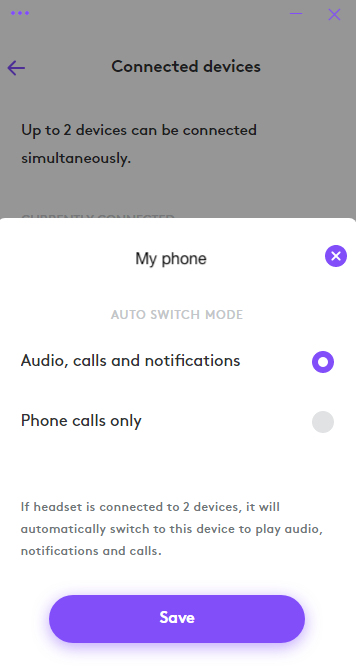
- If you select Audio, calls and notifications, the Bluetooth connected device will override the receiver connected device when there are audio, calls and notifications on the Bluetooth connected device.
- If you select Phone calls only, the Bluetooth connected device will only override the receiver connected device when there is a call on the Bluetooth connected device.
This setting will be defaulted to Audio, calls and notifications every time the headset powers off.
Viktig melding: Firmware Update Tool støttes eller vedlikeholdes ikke lenger av Logitech. Vi anbefaler at du bruker Logi Options+ for støttede Logitech-enheter. Vi hjelper deg gjerne under denne overgangen.
Viktig melding: Logitech Preference Manager støttes eller vedlikeholdes ikke lenger av Logitech. Vi anbefaler at du bruker Logi Options+ for støttede Logitech-enheter. Vi hjelper deg gjerne under denne overgangen.
Viktig melding: Logitech Control Center støttes eller vedlikeholdes ikke lenger av Logitech. Vi anbefaler at du bruker Logi Options+ for støttede Logitech-enheter. Vi hjelper deg gjerne under denne overgangen.
Viktig melding: Logitech Connection Utility støttes eller vedlikeholdes ikke lenger av Logitech. Vi anbefaler at du bruker Logi Options+ for støttede Logitech-enheter. Vi hjelper deg gjerne under denne overgangen.
Viktig melding: Unifying Software støttes eller vedlikeholdes ikke lenger av Logitech. Vi anbefaler at du bruker Logi Options+ for støttede Logitech-enheter. Vi hjelper deg gjerne under denne overgangen.
Viktig melding: SetPoint-programvaren støttes eller vedlikeholdes ikke lenger av Logitech. Vi anbefaler at du bruker Logi Options+ for støttede Logitech-enheter. Vi hjelper deg gjerne under denne overgangen.
Vanlige spørsmål
Det er ingen tilgjengelige produkter for denne seksjonen
Det finnes ingen nedlastinger for dette produktet
Det finnes ikke noen Nedlastinger for denne versjonen.
Compatible Product
