| Button | Usage | Action | |
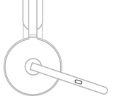 |
Call Controls | Answer / End call | Short press |
| Reject call | Two second press | ||
| Resume call | Short press | ||
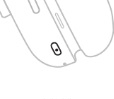 |
ANC Controls | Toggle between ANC and Transparency | Short press |
| ANC and Transparency off | Two second press | ||
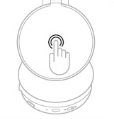 |
Media controls | Play / Pause | Double tap |
| Track forward | Triple tap | ||
| Volume controls | Volume up | Swipe up | |
| Volume down | Swipe down | ||
| Headset status | Check connectivity and battery status | Tap and hold for two seconds | |
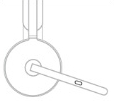 |
Mute | Mute on | Short press |
| Mute off | Short press | ||
| Voice assistance | Trigger voice assistant | Two second press (when mic is down) | |
NOTES:
- Media control functionality depends on the type of application.
- Call activities are always the first priority over media streaming. When two devices are connected, the Bluetooth connection will be prioritized over the receiver. When two Bluetooth devices are connected, the last active device will take a priority over the other. You can customize the priority between two Bluetooth devices on the Logi Tune app under Connected devices.
TIP: ANC and touch controls can also be customized on the Logi Tune app.
Viktig melding: Firmware Update Tool støttes eller vedlikeholdes ikke lenger av Logitech. Vi anbefaler at du bruker Logi Options+ for støttede Logitech-enheter. Vi hjelper deg gjerne under denne overgangen.
Viktig melding: Logitech Preference Manager støttes eller vedlikeholdes ikke lenger av Logitech. Vi anbefaler at du bruker Logi Options+ for støttede Logitech-enheter. Vi hjelper deg gjerne under denne overgangen.
Viktig melding: Logitech Control Center støttes eller vedlikeholdes ikke lenger av Logitech. Vi anbefaler at du bruker Logi Options+ for støttede Logitech-enheter. Vi hjelper deg gjerne under denne overgangen.
Viktig melding: Logitech Connection Utility støttes eller vedlikeholdes ikke lenger av Logitech. Vi anbefaler at du bruker Logi Options+ for støttede Logitech-enheter. Vi hjelper deg gjerne under denne overgangen.
Viktig melding: Unifying Software støttes eller vedlikeholdes ikke lenger av Logitech. Vi anbefaler at du bruker Logi Options+ for støttede Logitech-enheter. Vi hjelper deg gjerne under denne overgangen.
Viktig melding: SetPoint-programvaren støttes eller vedlikeholdes ikke lenger av Logitech. Vi anbefaler at du bruker Logi Options+ for støttede Logitech-enheter. Vi hjelper deg gjerne under denne overgangen.
Vanlige spørsmål
Det er ingen tilgjengelige produkter for denne seksjonen
Det finnes ingen nedlastinger for dette produktet
Det finnes ikke noen Nedlastinger for denne versjonen.
Compatible Product
