To switch from the USB receiver to Bluetooth, simply play audio on the connected Bluetooth device.
Audio will start playing automatically as the Bluetooth connection takes priority over the USB receiver.
To switch from Bluetooth to the USB receiver:
- Since the Bluetooth connection takes priority over the receiver, pause the audio on the connected Bluetooth device.
- Then, play audio on the device connected to the receiver.
Based on your preference, you can select when to let Bluetooth connected devices take priority over the receiver connected device on the Logi Tune app.
On the Logi Tune app, go to Connected Devices and click the Setting icon  next to Bluetooth connected devices.
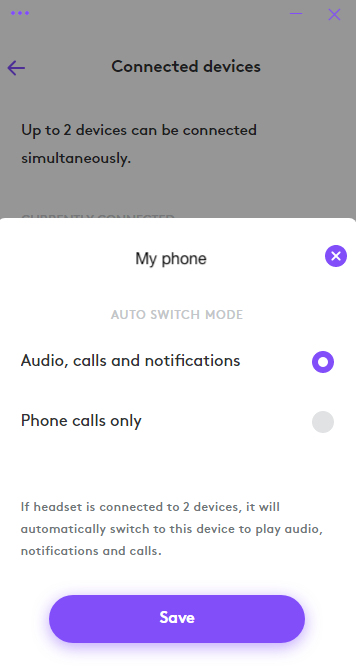
- If you select Audio, calls and notifications, the Bluetooth connected device will override the receiver connected device when there are audio, calls and notifications on the Bluetooth connected device.
- If you select Phone calls only, the Bluetooth connected device will only override the receiver connected device when there is a call on the Bluetooth connected device.
This setting will be defaulted to Audio, calls and notifications every time the headset powers off.
Önemli Not: Ürün Yazılımı Güncelleme Aracı artık Logitech tarafından desteklenen veya bakımı yapılan bir ürün değildir. Desteklenen Logitech cihazlarınız için Logi Options+ kullanmanızı tavsiye ederiz. Bu geçiş sürecinde size yardımcı olmak için buradayız.
Önemli Not: Logitech Preference Manager artık Logitech tarafından desteklenmiyor veya bakımı sağlanmıyor. Desteklenen Logitech cihazlarınız için Logi Options+ kullanmanızı tavsiye ederiz. Bu geçiş sürecinde size yardımcı olmak için buradayız.
Önemli Not: Logitech Control Center, artık Logitech tarafından desteklenmiyor veya bakımı sağlanmıyor. Desteklenen Logitech cihazlarınız için Logi Options+ kullanmanızı tavsiye ederiz. Bu geçiş sürecinde size yardımcı olmak için buradayız.
Önemli Not: Logitech Connection Utility artık Logitech tarafından desteklenmiyor veya bakımı sağlanmıyor. Desteklenen Logitech cihazlarınız için Logi Options+ kullanmanızı tavsiye ederiz. Bu geçiş sürecinde size yardımcı olmak için buradayız.
Önemli Not: Unifying Yazılımı artık Logitech tarafından desteklenmiyor veya bakımı sağlanmıyor. Desteklenen Logitech cihazlarınız için Logi Options+ kullanmanızı tavsiye ederiz. Bu geçiş sürecinde size yardımcı olmak için buradayız.
Önemli Not: SetPoint yazılımı artık Logitech tarafından desteklenmemekte veya bu yazılımın bakımını yapmamaktadır. Desteklenen Logitech cihazlarınız için Logi Options+ kullanmanızı tavsiye ederiz. Bu geçiş sürecinde size yardımcı olmak için buradayız.
Sıkça Sorulan Sorular
Bu bölüme uygun ürün yok
Bu Ürün için Güncelleme yok
Bu Sürüm için İndirme yok.
Compatible Product
