You can customize each of the multi-function button functionality by using the Jaybird App. There you can replace the default controls with the voice assistant and other preferred controls options.
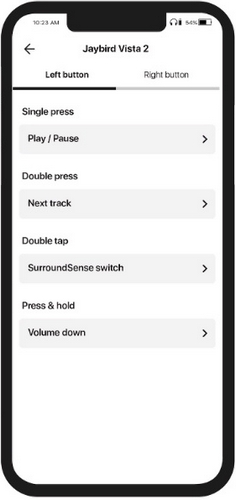
To customize the functionality of your Jaybird Vista 2 earbuds multi-function buttons:
- Download and install the Jaybird App.
- Open the Jaybird App on your phone.
- Navigate to Button Controls.
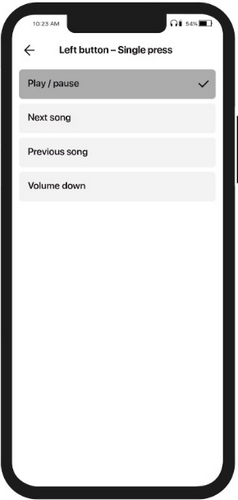
- On the Button Controls screen you can customize each multi-function button functionality by selecting your preferred action.
Please note that regardless of how you have customized the multi-function buttons, your earbuds automatically turn off when you put them in the charging case and close it. Your earbuds will automatically turn on when you open the charging case.
重要提示:罗技不再对固件更新工具提供支持或维护。强烈推荐您将 Logi Options+ 用于受支持的罗技设备。在此过渡期间,我们将为您提供帮助。
重要提示:罗技不再对 Logitech Preference Manager 提供支持或维护。强烈推荐您将 Logi Options+ 用于受支持的罗技设备。在此过渡期间,我们将为您提供帮助。
重要提示:罗技不再对 Logitech Control Center 提供支持或维护。强烈推荐您将 Logi Options+ 用于受支持的罗技设备。在此过渡期间,我们将为您提供帮助。
重要提示:罗技不再对 Logitech Connection Utility 提供支持或维护。强烈推荐您将 Logi Options+ 用于受支持的罗技设备。在此过渡期间,我们将为您提供帮助。
重要提示:罗技不再对 Unifying 软件提供支持或维护。强烈推荐您将 Logi Options+ 用于受支持的罗技设备。在此过渡期间,我们将为您提供帮助。
重要提示:罗技不再支持或维护 SetPoint 软件。强烈推荐您将 Logi Options+ 用于受支持的罗技设备。在此过渡期间,我们将为您提供帮助。
常问问题
此部分没有可用的产品
没有此产品的相关下载内容
没有此版本的相关下载内容。
Compatible Product
