| Button | Usage | Action | |
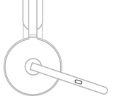 |
Call Controls | Answer / End call | Short press |
| Reject call | Two second press | ||
| Resume call | Short press | ||
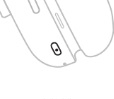 |
ANC Controls | Toggle between ANC and Transparency | Short press |
| ANC and Transparency off | Two second press | ||
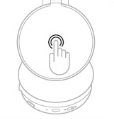 |
Media controls | Play / Pause | Double tap |
| Track forward | Triple tap | ||
| Volume controls | Volume up | Swipe up | |
| Volume down | Swipe down | ||
| Headset status | Check connectivity and battery status | Tap and hold for two seconds | |
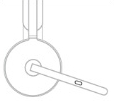 |
Mute | Mute on | Short press |
| Mute off | Short press | ||
| Voice assistance | Trigger voice assistant | Two second press (when mic is down) | |
NOTES:
- Media control functionality depends on the type of application.
- Call activities are always the first priority over media streaming. When two devices are connected, the Bluetooth connection will be prioritized over the receiver. When two Bluetooth devices are connected, the last active device will take a priority over the other. You can customize the priority between two Bluetooth devices on the Logi Tune app under Connected devices.
TIP: ANC and touch controls can also be customized on the Logi Tune app.
重要須知:韌體更新工具不再由 Logitech 支援或維護。我們強烈建議為支援的 Logitech 裝置使用 Logi Options+。在此過渡期間,我們會隨時為您提供協助。
重要須知:Logitech Preference Manager 已不再由 Logitech 支援或維護。我們強烈建議為支援的 Logitech 裝置使用 Logi Options+。在此過渡期間,我們會隨時為您提供協助。
重要須知:Logitech Control Center 已不再由 Logitech 支援或維護。我們強烈建議為支援的 Logitech 裝置使用 Logi Options+。在此過渡期間,我們會隨時為您提供協助。
重要須知:Logitech Connection Utility 已不再由 Logitech 支援或維護。我們強烈建議為支援的 Logitech 裝置使用 Logi Options+。在此過渡期間,我們會隨時為您提供協助。
重要須知:Unifying Software 已不再由 Logitech 支援或維護。我們強烈建議為支援的 Logitech 裝置使用 Logi Options+。在此過渡期間,我們會隨時為您提供協助。
重要須知:羅技不再支援或維護 SetPoint 軟體。我們強烈建議為支援的 Logitech 裝置使用 Logi Options+。在此過渡期間,我們會隨時為您提供協助。
常見問答集
沒有適用於此區段的產品
沒有適用於此產品的下載項目
沒有適用於此版本的下載項目。
顯示所有下載
Compatible Product
